
Who Wrote That? by Wikimedia Foundation, Community Tech Team
Explore authorship and revision information visually and directly in Wikipedia articles. Powered by WikiWho.
747 Users747 Users
Extension Metadata
Screenshots



About this extension
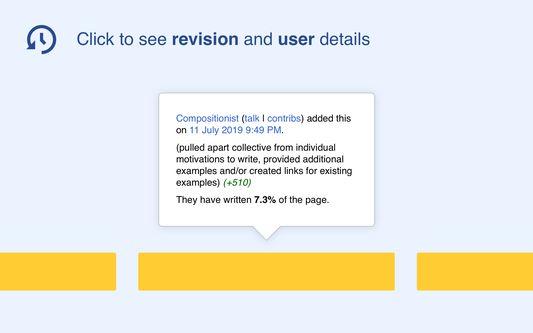
Who Wrote That? (WWT) is a browser extension, which displays authorship information directly on Wikipedia articles. When you hover over content, the tool highlights all content by the same author. When you click on content, the tool identifies the author of the revision, along with revision details. Overall, WWT allows users to discover the source and background of an edit, without digging through revision history.
Rated 4.4 by 13 reviewers
Permissions and data
Required permissions:
- Access your data for ar.wikipedia.org
- Access your data for ce.wikipedia.org
- Access your data for cs.wikipedia.org
- Access your data for de.wikipedia.org
- Access your data for dsb.wikipedia.org
- Access your data for en.wikipedia.org
- Access your data for es.wikipedia.org
- Access your data for eu.wikipedia.org
- Access your data for fa.wikipedia.org
- Access your data for fi.wikipedia.org
- Access your data for fr.wikipedia.org
- Access your data for hi.wikipedia.org
- Access your data for hu.wikipedia.org
- Access your data for id.wikipedia.org
- Access your data for it.wikipedia.org
- Access your data for ja.wikipedia.org
- Access your data for nl.wikipedia.org
- Access your data for no.wikipedia.org
- Access your data for pl.wikipedia.org
- Access your data for pt.wikipedia.org
- Access your data for ro.wikipedia.org
- Access your data for ru.wikipedia.org
- Access your data for sh.wikipedia.org
- Access your data for sr.wikipedia.org
- Access your data for sv.wikipedia.org
- Access your data for tr.wikipedia.org
- Access your data for uk.wikipedia.org
- Access your data for vi.wikipedia.org
Data collection:
- The developer says this extension doesn't require data collection.
More information
- Add-on Links
- Version
- 0.23.1.0
- Size
- 161.93 KB
- Last updated
- 2 days ago (May 11, 2026)
- Related Categories
- License
- MIT License
- Version History
- Add to collection
To generate the XPI, run `./node_modules/.bin/grunt run`. Afterwards the ZIP files should be in ./dist/extension_firefox. This also opens up a Firefox window for testing, but you can simply close it.